

I have an observation: people all over the world are cranky and short-tempered these days. Of course, much of that is due to big, serious things: the economy, and politics, and looming climate catastrophe; people feeling like they haven’t been heard; that their time and effort and freedom and privacy are being undermined. Severity 1 bugs, as it were.
A lot of people think about bugs as coding errors. In the Rapid Software Testing namespace, we hold that a bug is not necessarily a coding error, nor a failure to meet the programmer’s or designer’s intentions. To us, a bug is something that bugs somebody.
A little more formally, a bug is something that threatens the value of the product from someone’s perspective. A bug may cause loss (of data, time, money, opportunity, freedom,…), harm, damage, or diminished value. And if someone experiences bad feelings like fear, frustration, confusion, annoyance, and impatience, that’s a bug.
There’s this wonderful tool for Windows called “Everything”. It shows me a complete list of all the files on my system in real time. This allows me to find any file, anywhere on any of my hard drives instantly, if I know the file name. If I don’t know the exact name, or if I want a list of related files, I can filter the list with a regular expression.
But every time I start Everything, I get a notification from Windows that looks like this:
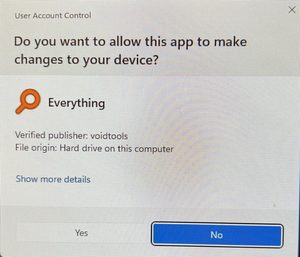
What if I opt to “Show more details”?
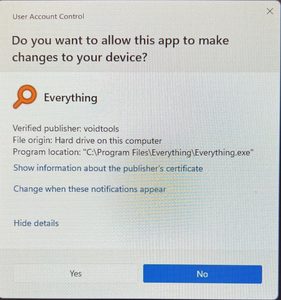
(These two images are fairly crappy because I had to take the with my phone. While the message is up, Windows suppresses access to everything else on the system, including the capacity to take a screen shot.)
Notice how the second dialog provides almost no more details than the first. Perhaps someone thought the extra details would be confusing. If so, it’s all the more confusing because the question (“Do you want to allow this app to make changes to your device?”) is separated from the Yes and No buttons.
But that’s not the big deal. The big deal is that my answer to this question, for Everything, is Yes. YES. Every single time, my answer is Yes. It will always be Yes. It will never not be Yes. So can I tell Windows to stop asking?
“Change when these notifications appear” might hold some promise.
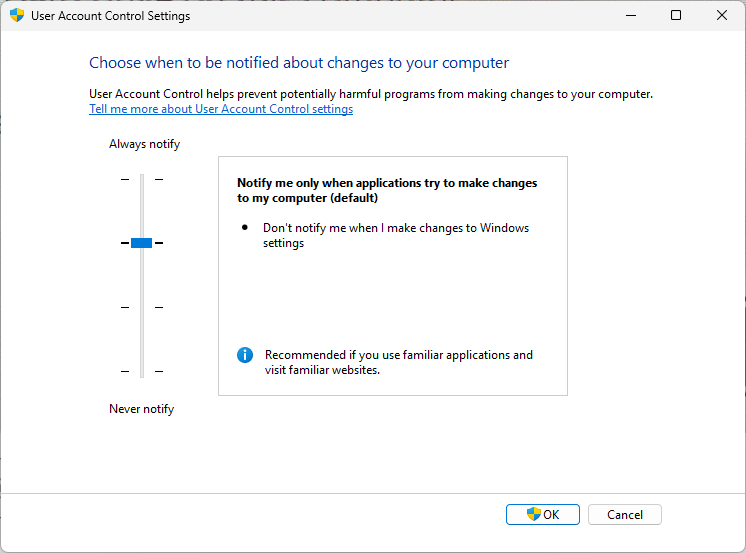
This could be really helpful… except it applies to all applications globally, and can’t be assigned to individual ones. There’s no whitelist; Windows doesn’t provide anything like that. So every time I start Everything, I have to respond to the that UAC dialog. It doesn’t matter if I’ve just shut down Everything and restarted it immediately; there’s the extra step.
Maybe there’s a way around this. Voidtools, the publisher, offers the opportunity to run the indexer as a Windows service, and to disable the “Run as Administrator” option. That should suppress the User Account Control message, according to Voidtools. But it doesn’t. The dialog stubbornly appears, every time.
Over to Microsoft Outlook. I have rules set up to make it convenient to forward copies of certain messages to my wife. Recently, this message started appearing every time I start Outlook:
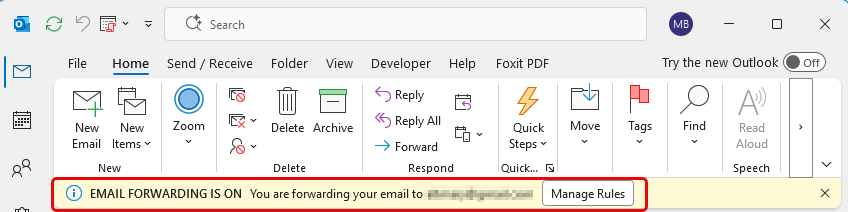
This message takes up a little screen real estate, and dismissing it is not a big deal. But it’s a little extra, unnecessary thing to do every time I start the program. And it’s uniformative. I have LOTS of email management rules set up; there’s no facility by which I could easily find the rule to which the alert refers.
Listen: I get it. Both of these problems are trivial; one click makes them go away. But they’re also completely unnecessary, and they add just a tiny bit of friction every time I start these programs.
There’s a principle that I applied back when I was a program manager; one that was part of the culture at Quarterdeck, where I worked all those years ago: a sufficient number of Severity 3 bugs adds up to a Severity 1 bug. Enough little irritants foster constant irritation and exhaustion. But they also foster inattention.
Where might this really matter? How about hospitals?
This episode of 99% Invisible (an utterly fabulous podcast, in case you didn’t know) outlines the problem of noise coming from medical devices in patient’s rooms. Few of them are productive. Lots of them are false alarms. According to the report, there’s a heart monitor that generates 86 alarms, each different from the others. Is sensemaking about them feasible? Quick? Significant?
We live in a world of distraction, irritation, and noise. So, ask:
- If an application or system posts an alert of some kind, is it necessary?
- Does the condition that trigger the alert really require someone’s immediate attention?
- Does the alert provide useful, understandable, and actionable information, distinct from other alerts from the same system?
- Is the alert distinguishable from alerts from other systems?
- If the user were to respond to a message, a dialog, or a sound, would their response make a difference?
- To what degree would the alert interrupt the user’s flow, or divert their attention away from things that matter?
- If the alert has been addressed once, does the alert need to be repeated?
- Is there a “Don’t show this message again?” option?
- Is there a “Don’t show this kind of message again” option?
- Can options to suppress a message or change a behaviour be applied per instance, or per application?
These questions cannot be answered with automated checks. AI might be useful for helping with various kinds of evaluations in testing. This isn’t one of them.Noticing these problems requires experiential testing, reasoning, context awareness, and — most importantly — competent social judgment. Testing must not only about what the software does. It must also be about how it feels to use the product.
One of the principles of Context-Driven Software Testing is that “The product is a solution. If the problem isn’t solved, the product doesn’t work.” There’s another implicit principle: if the product makes the user do even small amounts of unnecessary work, the product is making problems. Let’s not do that.